If you have come across the name Immorpos35.3 and wondered what it actually is, you are not alone. The unusual spelling, the version-style number at the end and the sudden appearance of the name across many blogs have pushed more people to search for it. The main question is simple: what is Immorpos35.3 software, and is it something you can trust?
The difficulty is that online descriptions do not agree. Some websites present it as business management or workflow automation software. Others link it with point-of-sale tools, and a few describe it as a general technical platform. Most of these pages never name a developer, link to official documentation or show a verified download page.
In this guide we look at what is reported about Immorpos35.3, separate those claims from what can be independently verified, and help you decide whether to use it. If you also like exploring new tools and platforms, our overview of Droven.io AI tools in 2026 is a useful companion read.
What Is Immorpos35.3 Software?
Immorpos35.3 is the name of a piece of software that appears in many online articles, usually described as a digital platform for workflow management, data organization and business operations. The name has no widely recognized publisher behind it, and no major software directory or official product page confirms the description.
What Different Websites Claim
Reading through articles that rank for the name, three descriptions appear most often:
• A business management or workflow automation platform.
• A POS-style or retail operations tool, probably because of the “pos” in the name.
• A general technical or enterprise tool for data handling and system integration.
Many of these pages repeat similar wording and rely on generic feature lists. That is why a careful reader should treat them as claims, not confirmed facts.
What Does 35.3 Mean?
The “35.3” most likely points to a version number, release or build, as it does in other software names. However, there is no official release history or changelog we could find that explains the numbering, so this is an assumption and not a confirmed detail.
Is There an Officially Verified Developer?
Not that we could confirm. We did not find a clearly identified company, an official website with a product page, or verifiable documentation. This gap is the single most important point in the whole discussion, and it affects every section below.
What Is Immorpos35.3 Software Used For?
According to the articles that mention it, Immorpos35.3 is mainly described for the following uses. These are reported uses, not verified capabilities.
Business Workflow Management
Several sources say it can help teams organize tasks, approvals and routine processes in one place so work moves from one stage to the next with less manual effort.
Data Processing and Organization
It is also described as a tool for collecting, sorting and storing business data so that records stay structured and easier to find.
Task Automation
Automation of repetitive tasks, such as recurring updates or notifications, is one of the most commonly repeated claims.
Reporting and Analytics
Some descriptions mention dashboards and reports that summarize performance and show trends over time.
Business Operations Management
A few pages go further and describe it as a central system for day-to-day operations, which is a broad claim that no official source supports.
Important: none of these uses has been confirmed by an official vendor, so test any claim yourself before relying on it.
Key Features of Immorpos35.3 Software
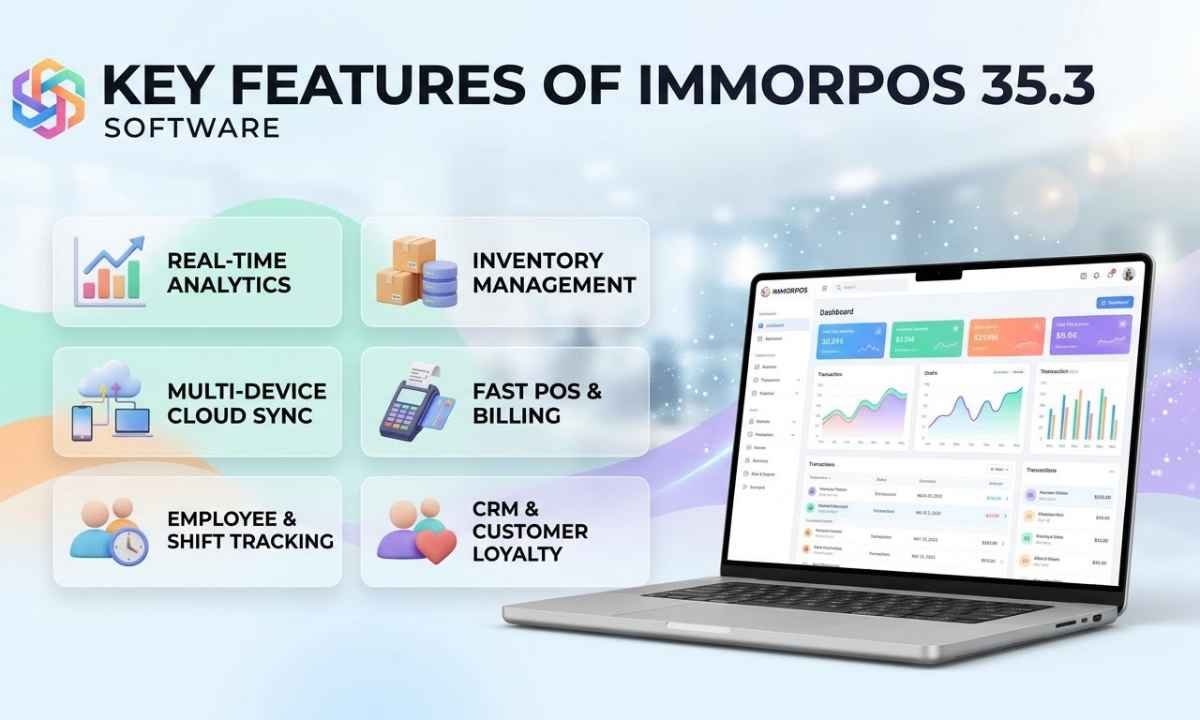
The table below summarizes the features most often attributed to Immorpos35.3 and shows how much confidence we can place in each.
| Feature | What Websites Say | Verification Status |
| Workflow Automation | Automates repetitive tasks and approvals | Not independently verified |
| Data Management | Organizes and stores business records | Not independently verified |
| Dashboard and Reporting | Shows summaries, charts and trends | Not independently verified |
| System Integration | Connects with other tools and databases | Not independently verified |
| User Access Management | Roles and permissions for team members | Not independently verified |
| Performance Monitoring | Tracks activity and system performance | Not independently verified |
How Does Immorpos35.3 Software Work?
No official documentation explains how it works, so the steps below describe the general workflow that online guides repeat. Treat them as a typical pattern for business software and not as a confirmed procedure.
1. Software installation and setup.
2. Initial configuration of settings and preferences.
3. User account management and permissions.
4. Data organization and import.
5. Workflow creation and automation rules.
6. Monitoring and reporting of results.
What Are the Potential Benefits of Immorpos35.3?
If the software performs as described, the benefits would be similar to those of other workflow and data tools:
• Improved workflow organization: tasks and processes in one place.
• Reduced repetitive tasks: less manual data entry and follow-up.
• Centralized data management: records stored in a single system.
• Better operational visibility: clearer reports on what is happening.
• Time management: more time for work that needs human judgment.
These are potential benefits only. Without a verified product, we cannot confirm that Immorpos35.3 delivers any of them.
Is Immorpos35.3 Software Legit or Fake?
The honest answer is that it is unclear. There is no proof that it is a scam, and there is also no solid proof that it is an established, supported product. Several signs call for caution.
| Check | What We Found |
| Online reputation | Name appears mostly on blogs with similar, generic wording |
| Conflicting descriptions | Described as business software, POS tool and technical platform |
| Developer and publisher | No verified company or developer identified |
| Official documentation | No official manual, changelog or support page found |
| Independent reviews | No reviews from trusted software review platforms found |
Pages that look like they were written to rank for a keyword, rather than to document a real product, are a common warning sign. If you want to see how to look at unfamiliar websites and brands more critically, our posts on Pinoroduct.com and ThriftyEvents.net walk through similar questions.
Is Immorpos35.3 Software Safe to Download?
Because the publisher is unknown, downloading it carries risk. Before you install anything with this name, work through these safety steps.
Verify the Download Source
Only download from an official website tied to a named developer. Avoid forums, file-sharing links and third-party mirror sites.
Check the Digital Signature
On Windows, right-click the installer, open Properties and look at the Digital Signatures tab. A missing or invalid signature is a red flag.
Scan Installation Files
Upload the file to a multi-engine scanner such as VirusTotal and run it through your antivirus before opening it.
Review Software Permissions
Be wary if it asks for admin rights, access to all files, camera or microphone access, or network permissions that do not match its stated purpose.
Protect Personal and Business Data
Never enter real customer records, passwords or financial data until you have confirmed the software is trustworthy.
Should You Use Immorpos35.3 Software?
For most people, the safest answer is: not until you can verify it. If you are asking yourself, should I use Immorpos35.3 software, consider the following.
When It May Be Worth Investigating
If a vendor or colleague has given you a specific installer and can name the company behind it, it may be worth testing in a controlled setting.
Why You Should Verify It First
A tool that handles business data can expose that data if it is poorly built or malicious. Verification takes minutes and can prevent serious losses.
Risks of Unidentified Applications
• Possible malware or bundled unwanted programs.
• Data theft or leaks of business information.
• No security updates or bug fixes.
• No support if something goes wrong.
Alternatives With Established Documentation
If you need workflow or business management software, choose a product with a known publisher, public documentation, a clear privacy policy and independent reviews. To compare modern options, you can start with our guide to Droven.io AI tools in 2026.
Why Official Support Matters
Real support means patches, answers and accountability. With an unverified tool, you have none of these.
What to Do Before Installing Immorpos35.3
| Step | Action | Why It Matters |
| 1 | Identify the software publisher | Confirms who is accountable for the product |
| 2 | Find an official product website | Gives you a trusted download and support source |
| 3 | Verify the installer | Checks file integrity and digital signature |
| 4 | Check system requirements | Prevents compatibility and performance problems |
| 5 | Review privacy and security policies | Shows how your data is collected and used |
| 6 | Test in a safe environment | Limits damage using a virtual machine or spare device |
Frequently Asked Questions
1. What Is Immorpos35.3 Software?
Immorpos35.3 is a software name described online as a business workflow and data management tool. Its details are unverified and no official developer is identified.
2. What Is Immorpos35.3 Software Used For?
Websites say it is used for workflow management, task automation, data organization and reporting. These uses are reported claims, not confirmed features.
3. Is Immorpos35.3 a Real Software Product?
Many articles mention it, but we found no official website, publisher or documentation. Its status as a real, supported product remains unconfirmed.
4. Should I Use Immorpos35.3 Software?
It is best to avoid it until you can verify the publisher and download source. If you must test it, do so in a safe, isolated environment.
5. Is Immorpos35.3 Safe to Download?
Safety cannot be guaranteed because the developer is unknown. Always scan the file, check its signature and download only from an official source.
6. Who Developed Immorpos35.3?
No verified developer or company could be identified in our research. Be cautious of any page that claims otherwise without proof.
7. What Does 35.3 Mean in Immorpos35.3?
It most likely indicates a version or build number, as in other software names. No official release notes confirm this.
8. Does Immorpos35.3 Support Windows?
Some guides suggest Windows support, but no official system requirements exist to confirm it. Check with a verified publisher before installing.
9. Is Immorpos35.3 Free?
Pricing is not clearly stated by any official source. Treat any free-download offer with extra caution.
10. Are There Alternatives to Immorpos35.3?
Yes, many established workflow and business tools have clear documentation and support. Look for a named publisher, reviews and a privacy policy.
Conclusion
So, what is Immorpos35.3 software? Based on what is publicly available, it is a name linked mostly to unverified claims about workflow automation, data management and business operations. Descriptions conflict, and no official developer, documentation or independent review confirms them.
The gap between online claims and verified product information is the key takeaway. Until a publisher and a trustworthy download source are identified, the safest approach is to avoid installing it, or to test it only in an isolated environment with no sensitive data.
Before installing any unfamiliar software, check the publisher, find official documentation, scan the file and review its permissions. For more reading on tools and platforms, you may also enjoy our post on the Gadgets360 new web series.